Skip to content

As we move into the final stretch of the school year, our focus shifts toward empowering students to take ownership of their growth. This month, we are highlighting the Resilient Lifelong Learner — a Resilient Lifelong Learner isn’t just someone who gets the right answer; they are students who embrace challenges, learn from setbacks, and remain curious in an ever-changing world. To support this mindset, we are thrilled to spotlight a new feature in Adobe Express.

Adobe Express has just released a new beta feature designed to bridge the gap between curriculum standards and creative student output. Teachers can now generate high-quality, engaging classroom activities in a matter of seconds.

How it works:

  • Input Your Goal: Simply type in a specific topic (e.g., "The Water Cycle"), a learning objective, or a state standard.
  • Instant Generation: The AI engine builds a complete classroom activity tailored to your prompt.
  • Student-Ready Instructions: It doesn't just create the "what"—it creates the "how," providing clear, step-by-step instructions for students to follow.
  • Teacher Refinement: Once the materials and instructions have been generated, teachers can change any part of the template or instructions to fine-tune it for your classroom before sharing it with students.

By automating the initial scaffolding, teachers can spend more time facilitating "productive struggle." Students get clear guardrails that allow them to experiment, fail safely, and iterate on their creative projects—the very heart of being a resilient learner.

Log in to your district Adobe Express account and look for the "Generate Activities" box under the “Teach” tab. Give it a standard you’re teaching next week and watch the magic happen.

a screenshot of the "generate classroom activities" box in Adobe Express

Our district is finalizing updates to all web content and mobile apps to meet the April 24, 2026, federal deadline for ADA digital accessibility. We are committed to ensuring that every student and family can independently access our online resources, from school websites to district documents. By meeting these WCAG 2.1 Level AA standards, we hope to make our digital community just as inclusive as our physical schools.

ADA Compliance by kelli.cannon


This month’s focus is on Digital Access. Adobe Express is designed with the philosophy that creativity should be accessible to everyone, regardless of physical ability or technical expertise. For educators, this means the platform provides several built-in "guardrails" and tools that ensure student-created content is inclusive from the start.

Key Accessibility Features

  • Alt-Text for Images: Users can add alternative text descriptions to images. This is essential for screen readers, allowing students who are blind or have low vision to understand the visual context of a project.
  • Auto-Captioning for Video: Adobe Express can automatically generate synchronized captions for video projects. This not only supports students who are d/Deaf or hard of hearing but also improves comprehension for English Language Learners (ELL).
  • Accessible PDF Export: When students create documents or flyers, Adobe Express supports exporting to PDF with basic tagging structures. This makes the final file more navigable for assistive technologies.

By integrating these tools into the creative process, teachers can move beyond simply teaching accessibility to making it a standard part of every digital assignment.

Watch this short video for some great tips for keeping your digital projects accessible: https://youtu.be/2jN2zeGtFs4?si=1AKPRSnrY6Z5IUu9 


This month, our Adobe Express spotlight is on becoming an Empathetic Communicator. In an era of digital noise, helping students bridge the gap between their internal feelings and their impact on others is essential. To bring this theme to life, we are highlighting a powerful project from educator Ramona Abraham-Coley: Student Identity Short Videos.

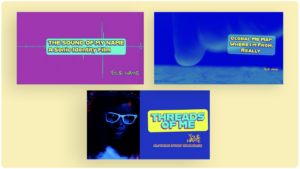
Cover images of three different student short video projects

She shares three easy-to-implement short video projects where students have to practice empathy and communication in a variety of ways.

  1. Students celebrate their voice, heritage, and community with The Sound of My Name video template.
  2. Students explore the locations around the world that influenced their identity with this Global Me storytelling video template.
  3. Students showcase a significant clothing item that reflects their heritage, religion, identity, or family narrative with this Threads of Me video template.

Bridging the Gap with Adobe Express

Empathetic communication begins with self-awareness. When students understand their own "why," they can more effectively share their stories with others. Using the intuitive video tools in Adobe Express, Ramona’s project encourages students to create short, punchy narratives that explore their unique backgrounds, values, and emotions.

How it works in the classroom:

  • Identify the Feeling: Students start by reflecting on an aspect of their identity that is often "invisible" to others.

  • Create the Connection: Using Adobe Express Video, students combine personal clips, icons, and voiceovers. This process forces them to consider how their creative choices—like music and pacing—affect the viewer's emotional response.

  • Measure the Impact: By sharing these videos, students receive immediate feedback on how their peers perceived their message, helping them "close the loop" on communication.

Start Creating

By practicing vulnerability through video, students learn that their voices have the power to build bridges rather than walls. You can find Ramona Abraham-Coley’s full tutorial and more inspiration here: https://express.adobe.com/learn/tutorial/express%2Fedu%2Fedu-creator-ramona-abraham-coley?source=learn-main-page&playlist=playlist%2Fexpress%2Feducator-collections.

Text on a comic book style background "embrace challenges"

Challenge: Have your students create a 30-second "Identity Short" this week to practice sharing their perspective with empathy and clarity!

Engage Your Student Citizens with a Media Diet Reflection

This month for our Adobe Update we are excited to share a dynamic new project using Adobe Express: Design a Web Page to Reflect on Your Media Diet perfect for developing Engaged Citizens

In this activity, students analyze their own media consumption, reflect on how information shapes their views, and then use Adobe Express to design web pages that visually represent their findings. This creative process builds critical media literacy, helping students understand the sources and impact of their daily information intake.

This project directly supports the Engaged Citizen element in our Portrait of a Graduate. By examining the role of media and sharing their reflections with peers, students learn to be informed, thoughtful participants in their communities. They develop the ability to question, evaluate, and act responsibly in a digital world—essential skills for contributing meaningfully to society now and in the future.